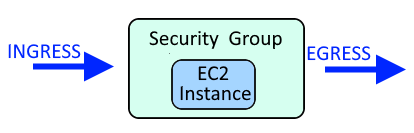
A Security Group is used to allow or deny requests coming in (ingress) and/or requests going out (egress). For example, a Security Group could be used to only allow requests within a certain IP address range to come in (ingress) and go out (egress) of an EC2 Instance.
This assumes you have already configured the aws command line tool. If not, check out my article on Getting Started with the AWS CLI.
The aws ec2 create-security-group command can be used to create a new EC2 security group.
~]$ aws ec2 create-security-group --group-name my-security-group --description "My security group"
{
    "GroupId": "sg-071234ca116e3abcd"
}
The --vpc-id option can be used to specify the Virtual Private Cloud (VPC) that the Security Group should be in.
aws ec2 create-security-group --group-name my-security-group --description "My security group" --vpc-id vpc-0a9d4cb29e2748444
If you want to include tags, such as Name, you'll do something like this.
~]$ aws ec2 create-security-group --group-name my-security-group --description "My security group" --tag-specifications 'ResourceType=security-group,Tags=[{Key=Name,Value=mysg},{Key=department,Value=IT}]'
{
    "GroupId": "sg-071234ca116e3abcd",
    "Tags": [
        {
            "Key": "Name",
            "Value": "mysg"
        },
        {
            "Key": "department",
            "Value": "IT"
        }
    ]
}
The aws ec2 describe-security-groups command can be used to list your EC2 security groups.
aws ec2 describe-security-groups
Something like this should be returned. Since no rules were included, by default, there are no inbound rules ("IpPermission": []) and egress (outbound) is allowed for all.
{
    "SecurityGroups": [
        {
            "Description": "My security group",
            "GroupName": "my-security-group",
            "IpPermissions": [],
            "OwnerId": "713123474252",
            "GroupId": "sg-071234ca116e3abcd",
            "IpPermissionsEgress": [
                {
                    "IpProtocol": "-1",
                    "IpRanges": [
                        {
                            "CidrIp": "0.0.0.0/0"
                        }
                    ],
                    "Ipv6Ranges": [],
                    "PrefixListIds": [],
                    "UserIdGroupPairs": []
                }
            ],
            "VpcId": "vpc-011234cfa335abcd1"
        }
    ]
}
Did you find this article helpful?
If so, consider buying me a coffee over at