
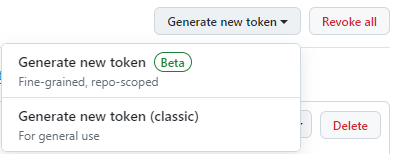
The gh auth login command can be used to log into GitHub. First, let's create a Personal Access Token by going to https://github.com/settings/tokens. Since oAuth tokens are still in Beta as of this writing, let's go with general use.
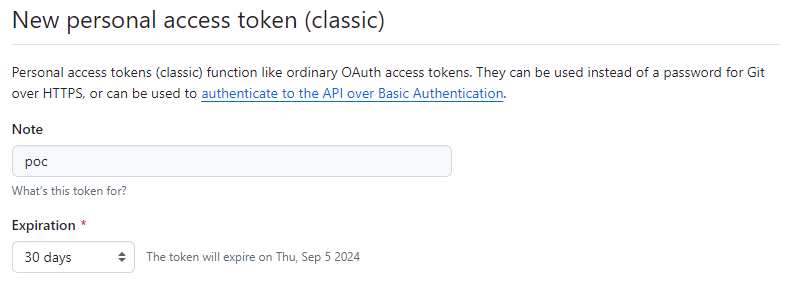
Let's give our Personal Access Token a unique name ("poc" in this example) and click generate token.
And now let's use the gh auth login command. You may be prompted to first select an account (I go with GitHub.com).
~]$ gh auth login
? What account do you want to log into?  [Use arrows to move, type to filter]
> GitHub.com
  GitHub Enterprise Server
And then prompted to use HTTPS or SSH.
? What is your preferred protocol for Git operations on this host?  [Use arrows to move, type to filter]
> HTTPS
  SSH
And then prompted to authenticate with your GitHub credentials. This is where I would select Y (yes).
? Authenticate Git with your GitHub credentials? (Y/n)
If you
? How would you like to authenticate GitHub CLI?  [Use arrows to move, type to filter]
> Login with a web browser
  Paste an authentication token
You may be prompted with a one-time code.
! First copy your one-time code: 7CDF-8959
And then open https://github.com/login/device and paste in the one-time code.
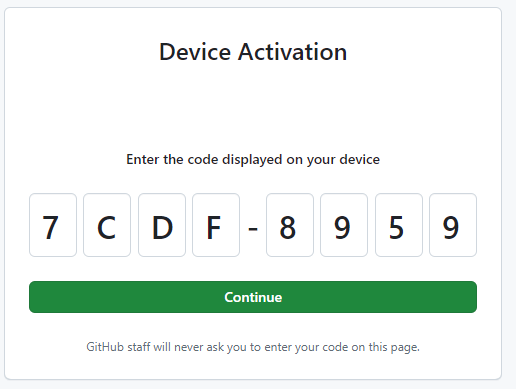
When prompted select Authorize github and if all goes well, you should get the following.

And you should be authenticated.
✓ Authentication complete.
! Authentication credentials saved in plain text
✓ Logged in as John-Doe
Notice the output says "Authentication credentials saved in plain text". This updates your $HOME/.gitconfig file with "credential".
~]$ cat .gitconfig
[user]
        name = john.doe
        email = john.doe@example.com
[credential "https://github.com"]
        helper =
        helper = !/usr/bin/gh auth git-credential
[credential "https://gist.github.com"]
        helper =
        helper = !/usr/bin/gh auth git-credential
And we should now be able to authenticate using the token with no interactive prompts. printf is probably better than echo because printf does not include trailing new line whereas echo does include trailing new line.
~]$ printf ghp_abcdefg123456789abcdefg123456789 | gh auth login --with-token
~]$ gh auth status
github.com
  ✓ Logged in to github.com account John-Doe (/home/john.doe/.config/gh/hosts.yml)
  - Active account: true
  - Git operations protocol: https
  - Token: ghp_************************************
  - Token scopes: none
~]$ gh auth logout
✓ Logged out of github.com account John-Doe
Notice the stdout of the `gh auth login` command references file .config/gh/hosts.yml. This file should contain each token that your local user account has used to authenticate to GitHub using the `gh` command.
github.com:
    users:
        john.doe:
            oauth_token: ghp_abcdefg123456789abcdefg123456789
        jane.doe:
            oauth_token: ghp_zxcvbnmlkjhgf1234567890129sdfsdf
    user: john.doe
    oauth_token: ghp_abcdefg123456789abcdefg123456789
The `gh logout` command can be used to "log out" of GitHub, which removes the token from your .config/gh/hosts.yml file.
gh auth logout --hostname github.com --user <username>
Or you can delete the .config/gh directory, so that you will have to log in again like it's the first time you are logging in.
rm -rf .config/gh
Optionally, the --hostname option can be used to target either github.com or some other hostname.
echo ghp_abcdefg123456789abcdefg123456789 | gh auth login --with-token --hostname github.com
Did you find this article helpful?
If so, consider buying me a coffee over at 