
First and foremost, it's important to understand that the PayPal SDK uses a client/server model, where the client is the frontend and the server is the backend.
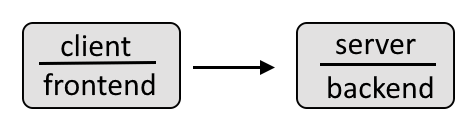
For example, the frontend client could look something like this, where the data gathered in the frontend is then passed onto and processed by the backend.
Check out my article FreeKB - PayPal - JavaScript frontend for more details on how to create the frontend.
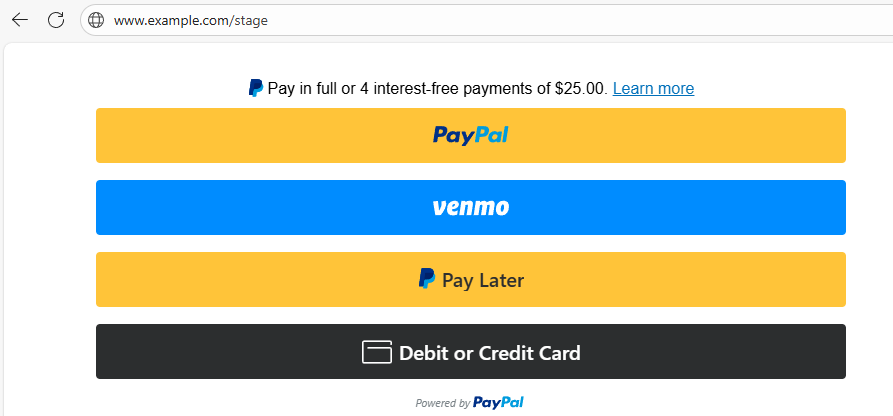
Let's say you have a Flask app that provides an HTML page that prompts for credit card information. Upon entering the credit card information, there is back and forth between Javascript and Python to process the transaction, and the user is then returned to an HTML page letting the user know if their transaction was successful.

Let's first set this up in the PayPal Sandbox environment.
- Go to https://developer.paypal.com/dashboard/applications/sandbox
- Select Create App and follow the prompts to create an app. You should get a Client ID and Secret.
Let's say your Flask app has the following structure.
├── main.py
├── my-project (directory)
│   ├── __init__.py
│   ├── checkout.py
│   ├── paypal_backend.py
│   ├── javascript (directory)
│   │   ├── paypal_frontend.js
│   ├── templates (directory)
│   │   ├── checkout.html
In this example, checkout.py could contain a route for your checkout.html page.
from flask import Blueprint, render_template
blueprint = Blueprint('my_route', __name__)
@blueprint.route('/checkout')
def checkout():
    paypal_client_id="your PayPal Client ID"
    return render_template('checkout.html', paypal_client_id=paypal_client_id)
And your checkout.html page could have the following, which uses paypal_frontend.js to render your PayPal checkout form.
<!DOCTYPE html>
<html>
<head></head>
<body>
<div id="paypal-button-container" class="paypal-button-container"></div>
<p id="result-message"></p>
<script src="https://www.paypal.com/sdk/js?client-id={{paypal_client_id}}¤cy=USD&components=buttons"></script>
<script src="{{ url_for('static', filename='javascript/paypal_frontend.js') }}"></script>
</body>
</html>
By default, JavaScript console.log will NOT append events to the Flask logger. Instead, console.log will just be available in the browsers console, in the F12 developer tools. This is problematic, because they you do not have any of the JavaScript logs that you can used for analysis and debuggging.
Here is an example of how you could append the JavaScript logs to the Flask logger. In this example, a function named my_logger is created in the JavaScript paypal_frontend.js file which POST to the Flask /log route.
// this is optional, but highly recommended, so that you can append events from the javascript frontend in your Flask logger
function my_logger(message) {
    console.log(message);
    return fetch(`/log`, {
        method: 'POST',
        headers: { 'Content-Type': 'application/json' },
        body: JSON.stringify({  message: message })
    });
}
async function createOrderCallback() {
    my_logger(`[${new Date().toJSON()}] This is the beginning of the createOrderCallback function`);
    my_logger(`[${new Date().toJSON()}] Submitting a POST request to /paypal/orders/create in paypal_backend.py`);
    try {
        var response = await fetch(`/paypal/order/create`, {
            method: "POST",
            headers: {
                "Content-Type": "application/json",
            })
    } catch (error) {
        my_logger(`[${new Date().toJSON()}] result: failed`)
        my_logger(`[${new Date().toJSON()}] message: ${error}`)
        return resultMessage({ result: "failed", message: `${error}` })
    }
    try {
        var response_json = await response.json()
    } catch (error) {
        my_logger(`[${new Date().toJSON()}] result: failed`)
        my_logger(`[${new Date().toJSON()}] message: ${error}`)
        return resultMessage({ result: "failed", message: `${error}` })
    }
    my_logger(`[${new Date().toJSON()}] JSON.stringify(response_json) => ${JSON.stringify(response_json)}`)

    if ( response_json.result != "success" ) {
        return resultMessage({ result: "failed", message: `${JSON.stringify(response_json)}` })
    } else {
        return response_json.order_id
    }
}
async function onApproveCallback(order_id) {
    my_logger(`[${new Date().toJSON()}] This is the beginning of the onApproveCallback function`);
    my_logger(`[${new Date().toJSON()}] Submitting a POST request to /paypal/orders/capture in routes_paypal_backend.py with the following body: ${JSON.stringify(order_id)}`);
    try {
        var response = await fetch(`/paypal/order/capture`, {
            method: "POST",
            headers: {
                "Content-Type": "application/json",
            },
            body: JSON.stringify(order_id)
        })
    } catch (error) {
        my_logger(`[${new Date().toJSON()}] result: failed`)
        my_logger(`[${new Date().toJSON()}] message: ${error}`)
        return resultMessage({ result: "failed", message: `${error}` })
    }
    try {
        var response_json = await response.json()
    } catch (error) {
        my_logger(`[${new Date().toJSON()}] result: failed`)
        my_logger(`[${new Date().toJSON()}] message: ${error}`)
        return resultMessage({ result: "failed", message: `${error}` })
    }
    my_logger(`[${new Date().toJSON()}] JSON.stringify(response_json) => ${JSON.stringify(response_json)}`)
    my_logger(`[${new Date().toJSON()}] JSON.stringify(response_json.status) => ${JSON.stringify(response_json.status)}`)
    if ( response_json.status != "COMPLETED" ) {
        return resultMessage({ result: "failed", message: `${JSON.stringify(response_json)}` })
    } else {
        if (!("purchase_units" in response_json )) {
            let message = "the response JSON returned by PayPal does not include purchase_units (this is unexpected). "
            message += `response_json => ${JSON.stringify(response_json)}`
            return resultMessage({ result: "failed", message: `${message}` })
        } else {
            response_json.purchase_units.forEach(purchase_unit => {
                my_logger(`[${new Date().toJSON()}] purchase_unit => ${JSON.stringify(purchase_unit)}`)

                try {
                    purchase_unit.payments
                } catch (error) {
                    let message = "the following error was captured when trying purchase_unit.payments. "
                    message += `error => ${error}. `
                    message += `response_json => ${JSON.stringify(response_json)}`
                    return resultMessage({ result: "failed", message: `${message}` })
                }
                my_logger(`[${new Date().toJSON()}] purchase_unit.payments => ${JSON.stringify(purchase_unit.payments)}`)
                try {
                    purchase_unit.payments.captures
                } catch (error) {
                    let message = "the following error was captured when trying purchase_unit.payments.captures. "
                    message += `error => ${error}. `
                    message += `response_json => ${JSON.stringify(response_json)}`
                    return resultMessage({ result: "failed", message: `${message}` })
                }
                purchase_unit.payments.captures.forEach(capture => {
                    my_logger(`[${new Date().toJSON()}] capture => ${JSON.stringify(capture)}`)
                    try {
                        capture.status
                    } catch (error) {
                        let message = "the following error was captured when trying capture.status. "
                        message += `error => ${error}. `
                        message += `response_json => ${JSON.stringify(response_json)}`
                        return resultMessage({ result: "failed", message: `${message}` })
                    }
                    if (capture.status != "COMPLETED") {
                        let message = "purchase_units.payments.captures.status is the PayPal response is NOT COMPLETED. "
                        message += `response_json => ${JSON.stringify(response_json)}`
                        return resultMessage({ result: "failed", message: `${message}` })
                    } else {
                        return resultMessage({ result: "success", response_json: `${JSON.stringify(response_json)}` })
                    }
                })
            })
        }
    }
}
function resultMessage(res) {
    my_logger(`[${new Date().toJSON()}] This is the beginning of the resultMessage function`);
    my_logger(`[${new Date().toJSON()}] res.result => ${res.result}`);
    var endpoint = `/order?result=${res.result}`;
    if (res.result != "success") {
        my_logger(`[${new Date().toJSON()}] res.message => ${res.message}`);
    }
    my_logger(`[${new Date().toJSON()}] redirecting to ${endpoint}`);
    document.location.replace(`${endpoint}`);
}
window.paypal
    .Buttons({
        createOrder: createOrderCallback,
        onApprove: onApproveCallback
    }
)
const cardField = window.paypal.CardFields({
    createOrder: createOrderCallback,
    onApprove: onApproveCallback
})
if (cardField.isEligible()) {
    my_logger(`[${new Date().toJSON()}] The if cardField.isEligible() statement evaluated to true`);
    my_logger(`[${new Date().toJSON()}] cardField.isEligible() = ${cardField.isEligible()}`);
    const nameField = cardField.NameField({
        placeholder:"Name on Card",
    }).render("#card-name-field-container")
    const numberField = cardField.NumberField({
        placeholder:"Card Number",
    }).render("#card-number-field-container")
    const expiryField = cardField.ExpiryField({
        placeholder:"MM / YY (card expiration month/year)",
    }).render("#card-expiry-field-container")
    const cvvField = cardField.CVVField({
        placeholder:"CVV (the 3 digit code on back of card)",
    }).render("#card-cvv-field-container")
    // After entering credit card info and clicking the Submit button the following checks if there are any issues or errors with the credit card data being passed in
    // If issues are found, failed is returned to the resultMessage functions and the order is NOT submitted.
    // If no issues are found, the order is submitted using cardField.submit which invokes window.paypal.CardFields which includes createOrderCallback and onApproveCallback
    document
        .getElementById("multi-card-field-button")
        .addEventListener("click", () => {
            cardField.getState()
                .then((state) => {
                    my_logger(`[${new Date().toJSON()}] cardField.getState() state => ${JSON.stringify(state)}`)
                    if (state.fields.cardNameField.isEmpty == true) {
                        let message = "It appears that the name on the credit card was not entered"
                        my_logger(`[${new Date().toJSON()}] ${message}`)
                        resultMessage({ result: "no_cvv", message: `${message}` })
                    } else if (state.fields.cardNameField.isValid == false) {
                        let message = "It appears that the name on the credit card is not valid"
                        my_logger(`[${new Date().toJSON()}] ${message}`)
                        resultMessage({ result: "invalid_cvv", message: `${message}` })
                    } else if (state.fields.cardNumberField.isEmpty == true) {
                        let message = "It appears that the credit card number was not entered"
                        my_logger(`[${new Date().toJSON()}] ${message}`)
                        resultMessage({ result: "no_number", message: `${message}` })
                    // this does a partial check to determine if the credit card is valid
                    // the first 4 integers of the credit card are used to determine the credit card issuer
                    // If PayPal determines that the credit card entered is not for a valid credit card providered, then isValid will be false
                    } else if (state.fields.cardNumberField.isValid == false) {
                        let message = "It appears that the credit card number is not valid"
                        my_logger(`[${new Date().toJSON()}] ${message}`)
                        resultMessage({ result: "invalid_number", message: `${message}` })
                    } else if (state.fields.cardExpiryField.isEmpty == true) {
                        let message = "It appears that the credit card expiration month/year was not entered"
                        my_logger(`[${new Date().toJSON()}] ${message}`)
                        resultMessage({ result: "no_expiration", message: `${message}` })
                    // this doesn't actually determine if the expiration month/year is valid
                    // it just checks if [0-9][0-9]/[0-9][0-9] was entered
                    } else if (state.fields.cardExpiryField.isValid == false) {
                        let message = "It appears that the credit card expiration month/year is not valid"
                        my_logger(`[${new Date().toJSON()}] ${message}`)
                        resultMessage({ result: "invalid_expiration", message: `${message}` })
                    } else if (state.fields.cardCvvField.isEmpty == true) {
                        let message = "It appears that the credit card CVV (3 digit number) was not entered"
                        my_logger(`[${new Date().toJSON()}] ${message}`)
                        resultMessage({ result: "no_cvv", message: `${message}` })
                    // this doesn't actually determine if the CVV is valid
                    // it just checks if a 3 digit integer was entered
                    } else if (state.fields.cardCvvField.isValid == false) {
                        let message = "It appears that the credit card CVV (3 digit number) is not valid"
                        my_logger(`[${new Date().toJSON()}] ${message}`)
                        resultMessage({ result: "invalid_cvv", message: `${message}` })
                    } else if (state.errors != 0) {
                        my_logger(`[${new Date().toJSON()}] ${error}`)
                        resultMessage({ result: "failed", message: `${error}` })
                    } else {
                        // if no errors detected then submit the transaction
                        // this is what calls createOrder and onApprove
                        cardField.submit()
                            .then(() => {})
                            .catch((submit_error) => {
                                my_logger(`[${new Date().toJSON()}] submit_error => ${JSON.stringify(submit_error)}`)

                                try {
                                    submit_error.data.body.details.forEach(detail => {
                                        try {
                                            let description = detail.description
                                            my_logger(`[${new Date().toJSON()}] description => ${JSON.stringify(description)}`)
                                            if (description == "Invalid card number") {
                                                resultMessage({ result: "invalid_number", message: `${description}` })
                                            } else {
                                                resultMessage({ result: "failed", message: `${description}` })
                                            }
                                        } catch (error) {
                                            let message = "got an unexpected error"
                                            resultMessage({ result: "failed", message: `${message}` })
                                        }
                                    })
                                } catch (error) {
                                    let message = "got an unexpected error"
                                    resultMessage({ result: "failed", message: `${message}` })
                                }
                            })
                    }
                })
                .catch((error) => {
                    my_logger(`[${new Date().toJSON()}] cardField.getState() cardField.submit() error => ${error}`)
                    resultMessage({ result: "failed", message: `${error}` })
                })
        })
}
And here is what you could have for the Flask /log route.
from flask import Blueprint

blueprint = Blueprint('my_route', __name__)

@blueprint.route('/log', methods=['POST'])
def log_from_paypal_frontend():
    data = request.get_json()
    logger(data['message'])
    return
Did you find this article helpful?
If so, consider buying me a coffee over at 