
Egress provides a way for an application deployed on OpenShift to send traffic out of the OpenShift cluster. For example, an application in a pod running on OpenShift may want to send a request to https://api.example.com and get a response from api.example.com.
There are two common types of Container Network Interfaces (CNI) used by OpenShift
- OpenShiftSDN
- OVNKubernetes
The following command can be used to determine if your OpenShift cluster is using OpenShiftSDN or OVNKubernetes.
oc get network.config/cluster --output jsonpath="{.spec.networkType}"
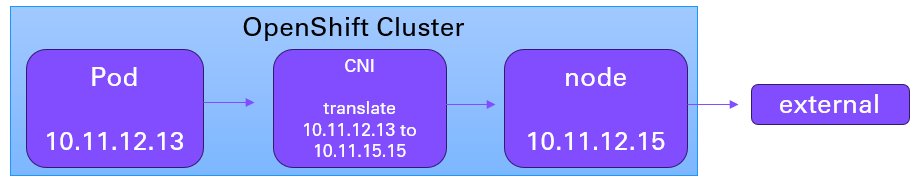
It is noteworthy that you may not need to assign an EgressIP address to your OpenShfit namespace to be able to send a request to a URL outside of your OpenShift cluster. The most basic architecture is that the OpenShift Container Network Interface (CNI) (OpenShiftSDN or OVNKubernetes) will translate the pod IP address to the external IP address of the node that the pod is running on. Assuming there is no additional IP or network address translation, when the request reaches the external URL, the request will show as coming from the nodes external IP address.

For example, let's say the pod IP address is 10.11.12.13 and the pod is running on my-node.
~]$ oc get pods --output wide
NAME     READY   STATUS    RESTARTS   AGE   IP             NODE
my-pod   1/1     Running   0          91d   10.11.12.13    my-node
And let's say the nodes external IP address is 10.11.12.15.
~]$ oc get node my-node --output wide
NAME       STATUS   ROLES            AGE    VERSION    INTERNAL-IP    EXTERNAL-IP
my-nodek   Ready    compute,worker   215d   v1.31.11   10.11.12.14    10.11.12.15
In this scenario, the OpenShift Container Network Interface (CNI) (OpenShiftSDN or OVNKubernetes) will translate the pod IP address 10.11.12.13 to the node external IP address 10.11.12.15. Assuming there is no additional IP or network address translation, when the request reaches the external URL, the request will show as coming from the nodes external IP address 10.11.12.15.
Optionally, an Egress Network Policy is like a firewall with a list of allow and deny rules, to allow or deny requests to certain DNS hostnames and/or IP addresses, as an additional layer of security. This is often used as a sort of zero trust policy, to deny all Egress traffic except for requests that are explicitly allowed.

One reason you may want to assign an EgressIP address to a namespace is to be to review the Container Network Interface (CNI) logs and to know what namespace a request is coming from based on the EgressIP address.
- If your OpenShift cluster is using OpenShiftSDN, then NetNamespace (this article) is used to assign an egress IP address to one or more namespaces.
- If your OpenShift cluster is using OVNKubernetes, then EgressIP is used to assign an egress IP address to one or more namespaces.
If you are not familiar with the oc command, refer to OpenShift - Getting Started with the oc command.
The oc get hostsubnet command can be used to list the netid and egress IP addresses associated with each master, worker and edge node in your cluster. Each node is a virtual machine, such as an Amazon Web Services (AWS) EC2 instance or a VMWare virtual machine, and the Host IP is the IP address of the virtual machine.
~]$ oc get hostsubnet
NAME        HOST         HOST IP        SUBNET        EGRESS CIDRS    EGRESS IPS
my-node-1   my-node-1    10.11.12.13    10.0.0.0/8    ["10.0.0.0/8"]  ["10.11.12.13","10.11.12.23","10.11.12.33"]
my-node-2   my-node-2    10.11.12.23    10.0.0.0/8
my-node-3   my-node-3    10.11.12.33    10.0.0.0/8
my-node-4   my-node-4    10.11.12.43    10.0.0.0/8
The oc patch hostsubnet command can be used to assign an egress IP address a node. This is typically done after the oc patch netnamespace command has been used to assign an egress IP address to a project / namespace. By assigning a specific egress IP address to a project / namespace, all outbound requests from applications / services in the project will come from the egress IP address, making it easy to find the requests that came from applications / services in the project.
AVOID TROUBLE
The egress IP address must be in the same subnet as the nodes egress CIDR. In this example, since the nodes egress CIDR is 10.10.100.0/24, the NetNamespace egress IP address assigned to the project must be in the 10.10.100.0/24 subnet.
~]# oc patch netnamespace my-project --type merge --patch '{ "egressIPs": [ "10.10.100.10" ] }'
netnamespace.network.openshift.io/my-project patched
Then the oc patch hostsubnet command can be used to assign the egress IP address one or more nodes.
~]# oc patch hostsubnet my-node-1 --type merge --patch '{ "egressIPs": [ "10.11.12.13" ] }'
hostsubnet.network.openshift.io/my-node-1 patched
The oc get hostsubnet command can then be used to see that the node has the egress IP address listed. In this example, my-node-1 now includes egress IP address 10.11.12.43.
~]$ oc get hostsubnet my-node-1
NAME        HOST         HOST IP        SUBNET        EGRESS CIDRS    EGRESS IPS
my-node-1   my-node-1    10.11.12.13    10.0.0.0/8    ["10.0.0.0/8"]  ["10.11.12.13","10.11.12.23","10.11.12.33","10.11.12.43"]
Did you find this article helpful?
If so, consider buying me a coffee over at 