
Let's say you have a web page that presents a log in form, perhaps something like this.
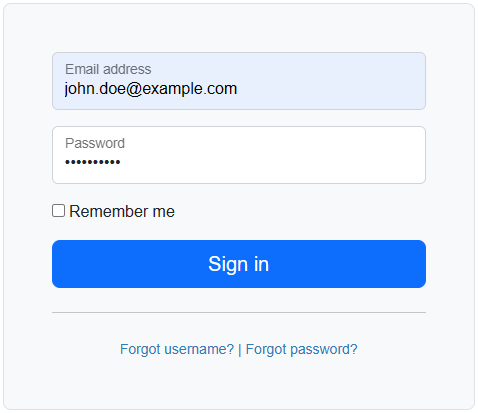
And you would like an automated way of testing the log in form. This can be done using the Node.js playwright package.
Let's say you have the following files on your system. By the way, it's much easier to do this on a system that has a graphical desktop such as Windows or Mac. This is challenging on a Linux system that doesn't have a graphical desktop since Playwrights run in a web browser.
├── package.json
├── tests
│   ├── my.spec.js
This assumes you have the npm (Node.js Package Manager) CLI installed on your system. If not, check out my article FreeKB - Node.js - Install Node.js on Linux. Let's use the npx install command to install the playwright and chromium packages in your package.json file.
npm install
The npm list command show now show that the packages in your package.json file have been installed in your present working directory.
~]$ npm list
playwrights@ /user/local/playwrights
├── @playwright/test@1.57.0
└── chromium@3.0.3
And then install playwright.
npx playwright install --with-deps
And let's say your tests/my.spec.ts file has the following. By default, playwright looks for spec.ts files in the tests directory. By the way, do NOT name this file playwright.spec.ts as this filename is reserved for the playwright configuration file. This test will pass if the log in is successful.
test('login test', async ({ page }) => {
  await page.goto('https://www.example.com/login');
  await page.getByLabel('Email address').fill('john.doe@example.com');
  await page.getByLabel('Password').fill('itsasecret');
  await page.getByRole('button', { name: 'Sign in' }).click();
  await page.waitForURL('https://www.example.com/loggedin');
});
The npx playwright test --list command can be used to ensure Playwright detects your my.spec.ts file in your tests directory, and that the file is a properly formatted file for Playwright.
]$ npx playwright test --list
Listing tests:
  tests/my.spec.ts:3:5 › has title
Total: 1 test in 1 file
The npx playwright test command can be used to run the test in your my.spec.ts file.
Running 1 tests using 1 worker


  ✓  1 tests\my.spec.ts:3:5 › login test (982ms)

  1 passed (2.4s)
Did you find this article helpful?
If so, consider buying me a coffee over at 