
If you are not familiar with the oc command, refer to OpenShift - Getting Started with the oc command.
There are two common types of network types used by OpenShift
- OpenShiftSDN
- OVNKubernetes
The following command can be used to determine if your OpenShift cluster is using OpenShiftSDN or OVNKubernetes.
oc get network.config/cluster --output jsonpath="{.spec.networkType}"
- If your OpenShift cluster is using OpenShiftSDN, then Network Policy and Egress Network Policy (this article) are used to allow or deny outgoing requests
- If your OpenShift cluster is using OVNKubernetes, then EgressFirewall is used to allow or deny outgoing requests
Egress provides a way for an application deployed on OpenShift to access an external URL, such as http://www.example.com.
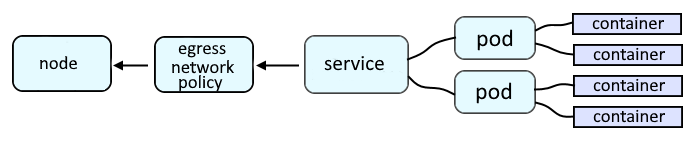
Following are the common types of Network Policies.
- Allow or deny all requests going out of a project / namespace
- Allow or deny requests going out of a project / namespace
- to an IP address and subnet (CIDR) IP subnet (e.g. 10.11.12.13/24)
- to a port (e.g. 8080)
- to a Port range (e.g. 30000 - 31000)
- to a DNS name (e.g. www.example.com)
For example, let's say you have a YAML file named networkpolicy.yml that contains the following markup. This network policy will allow all egress traffic in the project that this network policy exists in.
- podSelector: {} selects all pods in the project that this network policy exists in
- egress: - {} selects all pods the project the request is coming from
apiVersion: networking.k8s.io/v1
kind: NetworkPolicy
metadata:
  name: allow-all-egress
spec:
  podSelector: {}
  policyTypes:
    - Egress
  egress:
  - {}
This network policy will deny all egress traffic in the project that this network policy exists in.
- podSelector: {} selects all pods in the project that this network policy exists in
- Since the egress key is not used, this will effectively deny all ingress
apiVersion: networking.k8s.io/v1
kind: NetworkPolicy
metadata:
  name: deny-all-egress
spec:
  podSelector: {}
  policyTypes:
    - Engress
The oc apply or oc create command with the -f or --filename option can be used to create the network policy using the template JSON or YAML file.
The oc replace command can be used to replace a network policy using a new or updated template JSON or YAML file.
The oc edit command can be used to update a network policy template YAML file.
~]$ oc create --filename networkpolicy.yml
networkpolicy.networking.k8s.io/deny-all-egress created
The oc get networkpolicies command can then be used to list the network policies that have been created in the project.
Did you find this article helpful?
If so, consider buying me a coffee over at 