OpenShift - Allow or deny all egress traffic in a project using Egress Firewall

by
Jeremy Canfield |
Updated: November 23 2025
| OpenShift articles
If you are not familiar with the oc command, refer to OpenShift - Getting Started with the oc command.
There are two common types of network types used by OpenShift
- OpenShiftSDN
- OVNKubernetes
The following command can be used to determine if your OpenShift cluster is using OpenShiftSDN or OVNKubernetes.
oc get network.config/cluster --output jsonpath="{.spec.networkType}"
- If your OpenShift cluster is using OpenShiftSDN, then Network Policy and Egress Network Policy are used to allow or deny outgoing requests
- If your OpenShift cluster is using OVNKubernetes, then EgressFirewall (this article) is used to allow or deny outgoing requests
Egress provides a way for an application deployed on OpenShift to access an external URL, such as http://www.example.com.
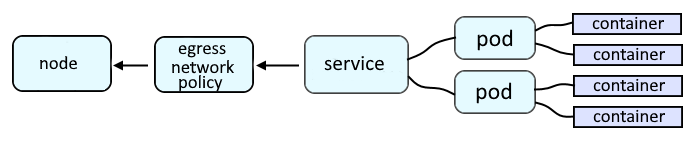
Following are the common types of EgressFirewall Policies.
- Allow or deny all requests going out of a project / namespace
- Allow or deny requests going out of a project / namespace
- to an IP address and subnet (CIDR) IP subnet (e.g. 10.11.12.13/24)
- to a port (e.g. 8080)
- to a Port range (e.g. 30000 - 31000)
- to a DNS name (e.g. www.example.com)
For example, let's say you have the following egressfirewall. This will only allow connections to www.example.com and 10.11.12.13/24 from the namespace.
apiVersion: networking.k8s.io/v1
kind: NetworkPolicy
metadata:
  name: my-egress-firewall
spec:
  egress:
  - to:
      dnsName: www.example.com
    type: Allow
  - to:
      dnsName: 10.11.12.13/24
    type: Allow
  - to:
      cidrSelector: 0.0.0.0/0
    type: Deny
Did you find this article helpful?
If so, consider buying me a coffee over at 